
Life360 alternative: temporary group sharing vs ongoing family location
Last updated:
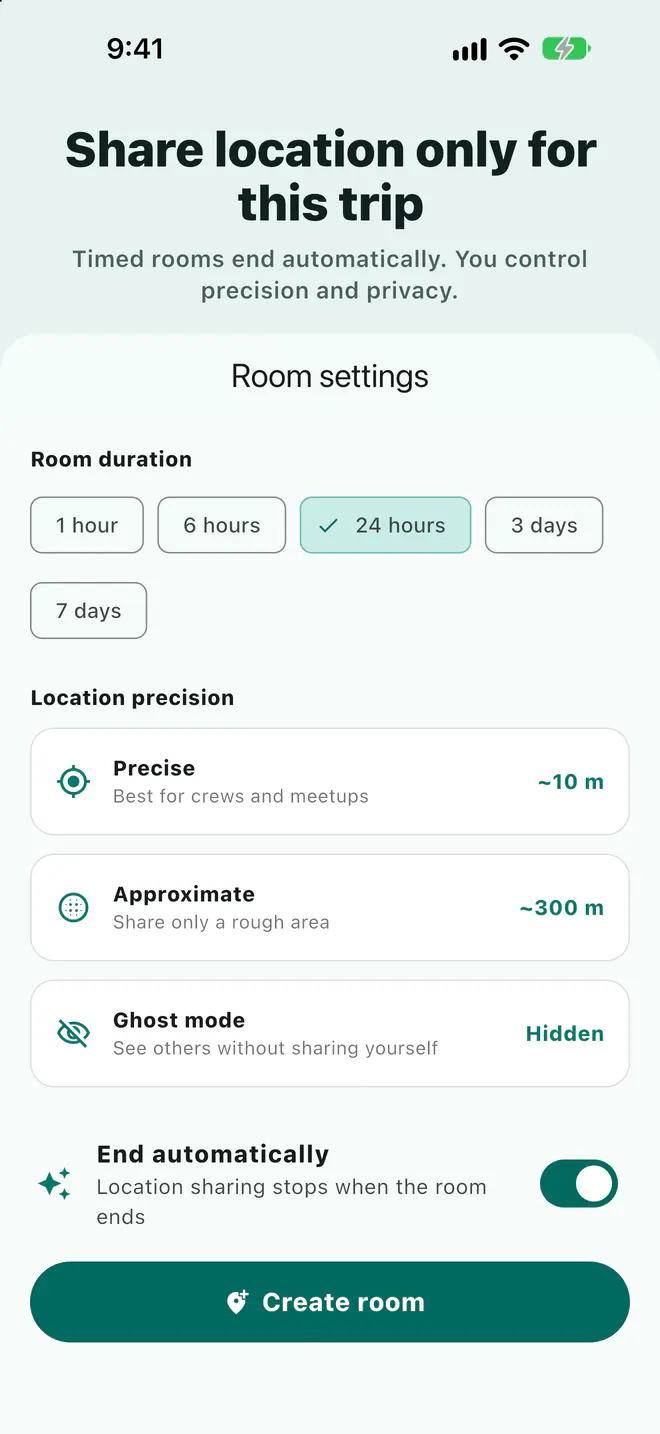
Life360 is a location sharing app built around Circles of family and friends, suited to ongoing sharing, place arrival alerts, and driving safety features. For a trip, group ride, or event where sharing should stop when it's over, a time-limited room fits better. Laiki rooms close automatically, offer precision options and Ghost mode, and open in a browser for viewers.
What Life360 is built for
According to Life360, you create a Circle of family and/or friends, share real-time location within it, and get notified when members arrive at or leave designated Places. Many people belong to more than one Circle, such as one for a partner, one for family, and one for friends.
Life360 also offers driving features such as Crash Detection and driving summaries. Per Life360 Help, Crash Detection requires Drive Detection and "Always On" location, and emergency dispatch is available only on certain paid memberships in certain countries.
When Life360 is the better fit
- Ongoing family sharing: for example, knowing when your kids get home from school.
- Arrival and departure alerts for fixed places: home, school, work.
- Driving safety features: Crash Detection, driving summaries, and more.
These are long-term needs with a stable group of people, which is what Life360 is designed around.
When you need a temporary group instead
Road trips, group rides, hikes, concerts, and company outings often bring together people who aren't family and only need to see each other for this one trip. The needs are different:
- Sharing stops when the trip ends: nobody wants to stay visible afterward.
- No long-term group to join: friends of friends, coworkers, and riders who only come once.
- Meeting points and a route: people need to know where to regroup, not just see dots on a map.
How Laiki handles temporary groups
Laiki uses a room for each outing. Open one, share the link, join code, or QR code in your group text, iMessage, or WhatsApp chat, and everyone who joins appears on the same map.
- Every room ends: choose how long it stays open, and it closes automatically. On the free plan, rooms last up to 3 days with up to 8 people.
- You choose how much to share: each room can use Precise (about 10 m) or Approximate (about 300 m) location, and Ghost mode lets you see others without sharing yourself.
- Viewers don't need the app: anyone with the link can view the room map in a browser. Sharing your own location or using voice requires the app.
- Meeting points, routes, voice: drop meeting points on the map, let each person draw one planned route, and use hold-to-talk to reach the whole room.
- Live locations aren't stored in your account: they're cleared when the room ends.
Rooms also have an SOS button that alerts everyone in the room with your location. It is not an emergency service; in an emergency, call 911.
Try your phone's built-in sharing first
- Find My on iPhone: when you share with a friend, you choose how long, can set a custom end time, or hide your location. Viewers need an Apple device.
- Google Maps location sharing: pick a duration when you share; for someone without a Google Account, a link works for up to 24 hours.
For one-to-one, short sharing, built-in tools are enough. For a group with mixed iPhone and Android that also needs meeting points, open a room.
Life360 and Laiki compared
| Life360 | Laiki | |
|---|---|---|
| Built around | Ongoing Circles of family and friends | A time-limited room for one outing |
| How long | Long-term Circles; you can join several | Room closes automatically at its end time |
| Alerts | When members arrive at or leave Places | "Alert me when nearby" on a companion |
| Driving | Crash Detection, driving summaries | No driving analysis or crash detection |
| Help | SOS; emergency dispatch on certain paid memberships in certain countries | SOS alerts everyone in the room; not an emergency service |
Which one to use
- Ongoing family check-ins, arrival alerts, or driving safety: Life360.
- One-to-one, short sharing: Find My or Google Maps.
- A group trip, ride, or event where sharing should end with it: a Laiki room.
FAQ
Can Laiki replace Life360 for ongoing family tracking?
Laiki rooms always end, so it isn't designed for around-the-clock tracking. For ongoing family sharing, an app like Life360 is a better fit.
Can friends see the map without installing anything?
Yes, anyone with the link can view a Laiki room map in a browser. Sharing your own location or using voice requires the app.
Does Laiki SOS call emergency services?
No. SOS only alerts people in the same room with your location. In an emergency, call 911.
Does it work across iPhone and Android?
Yes. Laiki is available for iPhone and Android, and everyone joins with the same room link.
Sources
Related guides
- Group motorcycle rides: how does everyone know where everyone is?
- How do you share your location from an iPhone with an Android user?
- Multi-car road trip: how do you keep the cars together?
- Group bike rides: how do you keep from dropping anyone?
- Group hiking: how do you keep everyone together on the trail?
- Group rides and meetups: how do you collect RSVPs and check people in?
- How do you share your location temporarily without being tracked forever?
- Offline maps for group trips: what works without signal?
- Walkie-talkie options for group rides, compared
Next trip, just open a room
The free plan already includes rooms, live location, meeting points, and planned routes.
Get Laiki