
How do you share your location temporarily without being tracked forever?
Last updated:
Pick an end time before you share. Google Maps location sharing lets you choose how long; iPhone Find My and Messages offer an hour, until the end of the day, or indefinitely; and a one-time pin shows only where you are now. For a group outing, a Laiki room always has an end time and closes on its own.
First, decide what kind of sharing you need
- "I'm here": send a single location. The other person can't follow where you go next.
- "I'm on my way": share until you arrive.
- "Watch for me for a while": choose a time limit that ends on its own, not "until you turn this off" or "indefinitely".
Google Maps: choose how long to share
- Open Google Maps and make sure you're signed in to your Google Account.
- Tap your profile picture, then Location sharing, then New share.
- Choose how long you want to share your location, pick the person, and tap Share.
The list also includes "Until you turn this off", which keeps sharing until you stop it yourself. The recipient needs a Google Account; for someone without one, share a link instead, which lasts up to 24 hours. While navigating by car, foot, or bike, Share trip progress stops sharing when you arrive or end navigation.
iPhone: three time limits in Find My or Messages
- In Find My, tap the Me tab and turn on Share My Location, then add a person in the People tab. Or in a Messages conversation, tap the Plus button, then Location.
- Choose to share for an hour, until the end of the day, or indefinitely.
For short-term sharing, pick an hour or until the end of the day. Live Location requires both people to have an iPhone with iOS 15 or later, so Android friends can't view it. Dropping a pin in Messages shares only that one location, and the other person can't follow you as you move.
LINE: send one place
If your group uses LINE, tap "+" in the chat, then Location, pick a place, and send. The recipient gets the one place you picked, which is fine for "I'm here" or "meet here" but doesn't update as you move.
For a group outing: open a Laiki room that ends
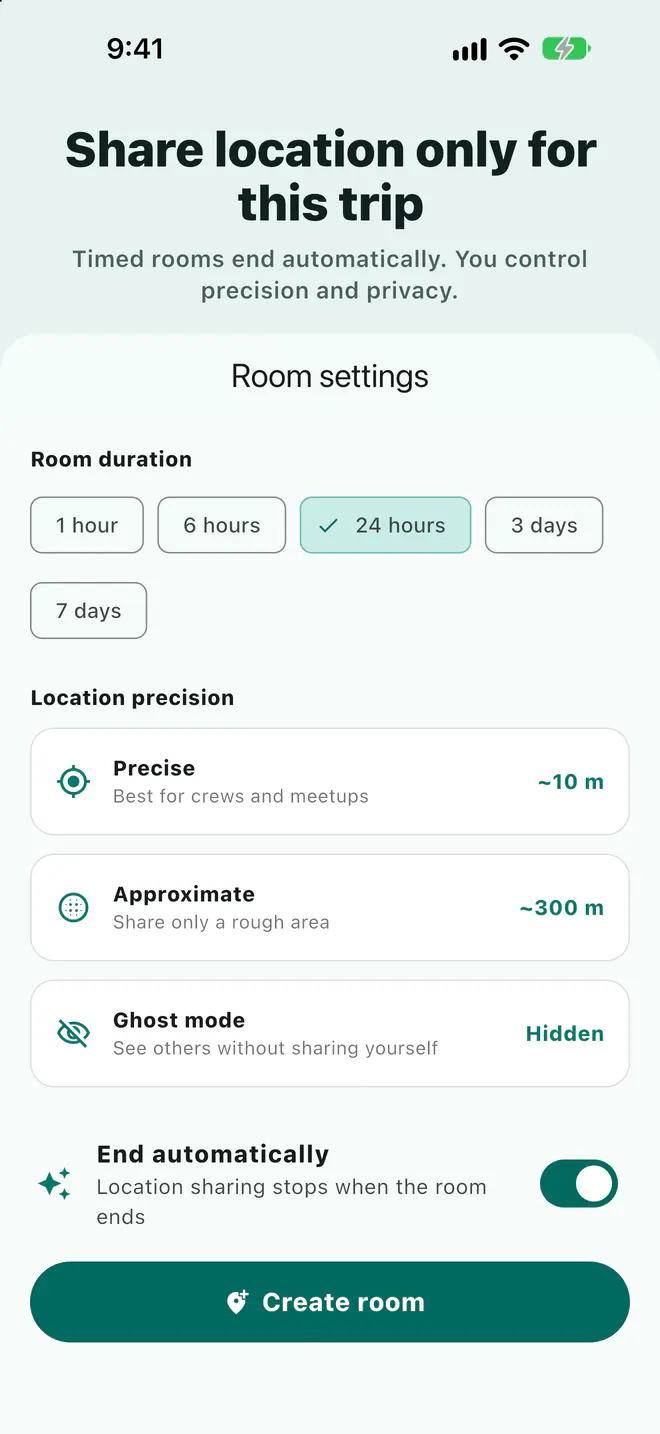
- Open a room in Laiki and choose how long it stays open (from 1 hour) and how precise locations are.
- Post the room link or join code in your group text, and everyone joins with the app.
- The room closes on its own when time is up; with End automatically on, your location sharing stops when the room ends.
Precision options are Precise location (about 10 m), Approximate location (about 300 m), or Ghost mode to view others without sharing yourself. Live locations are never stored in your account and are cleared when the room ends. iPhone and Android users share one room, and people without the app can view the room map in a browser. On the free plan, rooms last up to 3 days with up to 8 people.
The options compared
| Option | How long | iPhone and Android | Groups |
|---|---|---|---|
| Google Maps location sharing | You choose, or until you turn it off; links up to 24 hours | Yes, with a Google Account or a link | Share with each person |
| Google Maps trip progress | Until you arrive or stop navigating | Yes | People you pick |
| iPhone Find My / Messages | An hour, end of day, indefinitely | No, both need an iPhone | Everyone in a group message sees it |
| LINE location | One place only | Yes, both use LINE | The chat sees it, no updates |
| Laiki room | From 1 hour up to your plan's limit; always ends | Yes; a browser to view only | Yes, one room, one map |
FAQ
What does "Until you turn this off" do in Google Maps?
It keeps sharing until you stop it manually. For temporary sharing, choose a time limit or share a link, which lasts up to 24 hours.
Is someone notified when I stop sharing on iPhone?
According to Apple Support, the person you stop sharing with won't be notified.
Can I forget to close a Laiki room?
No. Every room has an end time and closes automatically, and live locations are cleared.
Can people see I'm nearby without my exact spot?
Choose Approximate location when opening a Laiki room so others see you within about 300 m, or use Ghost mode to not share at all.
Sources
Related guides
- Group motorcycle rides: how does everyone know where everyone is?
- How do you share your location from an iPhone with an Android user?
- Multi-car road trip: how do you keep the cars together?
- Group bike rides: how do you keep from dropping anyone?
- Group hiking: how do you keep everyone together on the trail?
- Group rides and meetups: how do you collect RSVPs and check people in?
- Offline maps for group trips: what works without signal?
- Walkie-talkie options for group rides, compared
- Life360 alternative: temporary group sharing vs ongoing family location
Next trip, just open a room
The free plan already includes rooms, live location, meeting points, and planned routes.
Get Laiki