
Multi-car road trip: how do you keep the cars together?
Last updated:
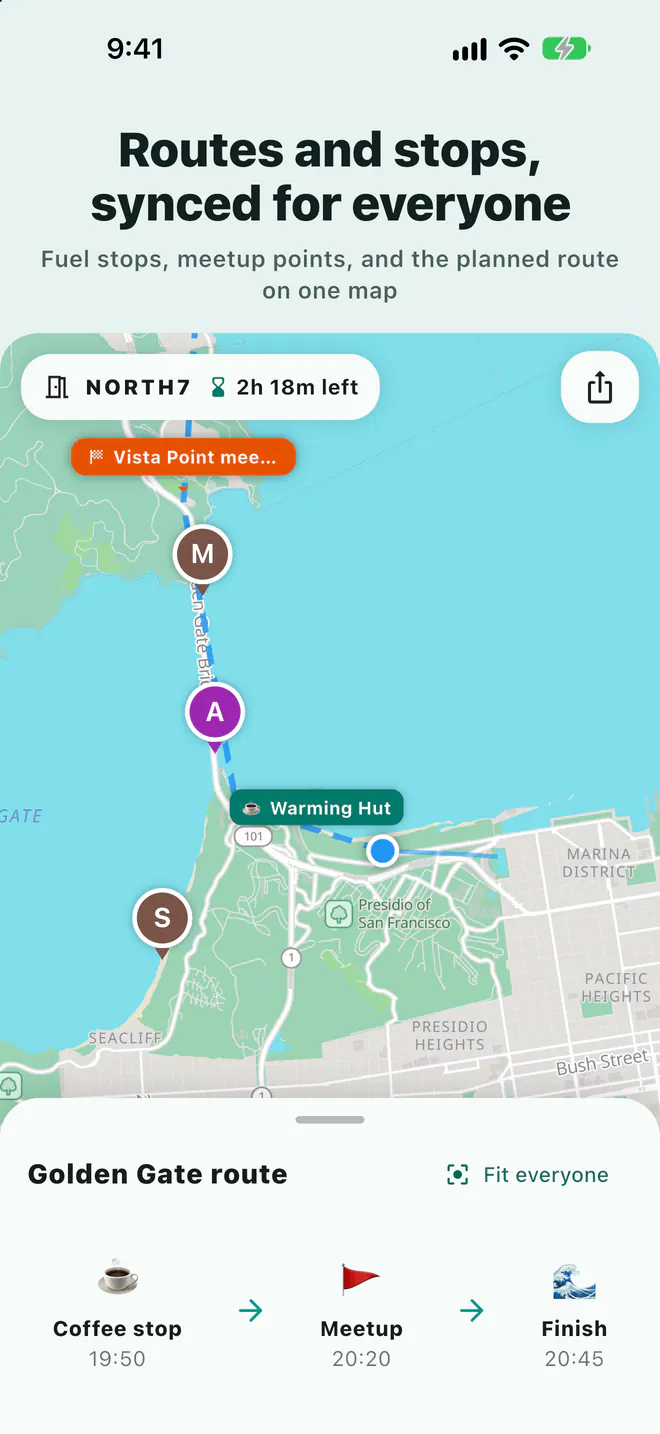
Cars in a convoy usually split at lights, interstate exits, and gas stops. Agree on the route and stops before leaving, then have a passenger in each car watch one shared map. A Laiki room does this: post the link in the group text, and every car, meeting point, and planned route share one map until the room ends.
Why multi-car trips get separated
- Lights and traffic cut the line: the lead car clears the intersection, the next one stops, and one more light later they are out of sight.
- Exits and interchanges: the car behind can't tell which exit the lead took, and one wrong exit can cost a long detour.
- Separate stops: one car pulls off for gas or a restroom and nobody else knows.
- Drivers can't text: "where are you guys?" waits until a passenger answers or the car stops, and a solo driver can't answer at all.
Before you leave: route, stops, and a navigator in each car
- Pick a navigator per car. The passenger handles the map, the group text, and voice, so the driver only drives. A car with just a driver checks the map at stops only.
- Draw the route and mark the stops. Draw a planned route in the Laiki room and mark rest stops, gas stations, and the lunch spot as landmarks. The free plan allows 10 landmarks per room and 30 points per planned route; Plus and up can snap the route to roads.
- Open the room and check every car is on the map. Post the room link or join code in the group text. At least one phone per car joins, and before you roll out, confirm each one appears and is updating.
On the road: the navigator watches the map
In the room, each person's position, heading, speed, and phone battery appear on one map. Sharing continues with the phone in a mount or a bag, as long as Laiki has location permission.
- Lead car waiting for the others: turn on "Alert me when nearby" for someone in the trailing car, and your phone notifies you as they approach. The free plan allows 1 alert at a time; Plus allows 10.
- Switching to the next rest stop: add or move a meeting point and the whole room sees it immediately.
- Hold to talk: one voice message reaches the whole room, faster than typing "we're taking the next exit." Voice needs a data connection, so expect gaps in dead zones.
Never use your phone while driving. Hand the map, alerts, and voice to a passenger, or wait until you are parked.
Meeting up at a rest stop
The first car in drops a meeting point where it parked, so the others know which part of the lot to head for before they pull in. The map shows who is still on the interstate and who has parked, so nobody circles the lot looking for the other car. Before heading out, check that everyone is on the map.
Battery and car chargers
Continuous location uses more battery than usual, so plug every phone into a car charger on long drives. Everyone's battery level is on the map and turns red when low, so you know why a car stopped updating.
Group size, room length, and privacy
The plan of whoever opens the room sets the group size and how long the room stays open. Two or three cars for a weekend fit the free plan; for a bigger convoy or a week-long road trip, see below.
| Plan | People per room | Longest room | Landmarks per room |
|---|---|---|---|
| Free | 8 people | 3 days | 10 |
| Plus | 10 people | 5 days | 25 |
| Pro | 20 people | 7 days | 50 |
| Max | 50 people | 14 days | 100 |
See the App Store or Google Play purchase screen for current prices. Every room closes on its own. Live locations are never stored in your account and are cleared when the room ends, and Ghost mode takes you off the map anytime.
FAQ
Does everyone need to join, or one phone per car?
One phone per car is enough to see that car on the map. If you want everyone to use hold to talk, have each person join; the size limit follows the room owner's plan.
Can family at home follow along without the app?
Yes, anyone with the link can view the room map in a web browser. Sharing your own location or using voice requires the app.
Does it update without cell service?
No. Location sharing and voice need a data connection. In a dead zone the map keeps the last known position and catches up when you have signal again.
What if we have more than 8 people?
Group size follows the room owner's plan: Plus 10, Pro 20, Max 50. Only the person opening the room needs to upgrade.
Related guides
- Group motorcycle rides: how does everyone know where everyone is?
- How do you share your location from an iPhone with an Android user?
- Group bike rides: how do you keep from dropping anyone?
- Group hiking: how do you keep everyone together on the trail?
- Group rides and meetups: how do you collect RSVPs and check people in?
- How do you share your location temporarily without being tracked forever?
- Offline maps for group trips: what works without signal?
- Walkie-talkie options for group rides, compared
- Life360 alternative: temporary group sharing vs ongoing family location
Next trip, just open a room
The free plan already includes rooms, live location, meeting points, and planned routes.
Get Laiki