
Offline maps for group trips: what works without signal?
Last updated:
Download offline maps before you go and Google Maps or Apple Maps will still show the map and guide you with no connection. Offline maps store the map, not people: friends' live locations need a connection. Download the whole route, agree on regroup points and times, and check locations whenever you have signal.
What an offline map actually stores
An offline map saves an area to your phone so you can open it, search places, and navigate without a connection. It stores the map, not people: other people's live locations have to reach your phone over the internet, so they aren't part of it. Before a trip with no coverage you need two things: an offline map that covers the whole route, and a plan for regrouping when nobody has signal.
Google Maps: download an offline map
- While connected, open the Google Maps app.
- Tap your profile picture or initial, then Offline maps.
- Tap Select your own map, adjust the area to cover your route, and tap Download.
According to Google Maps Help:
- Offline maps can't be downloaded in some countries or regions because of contractual limitations and other reasons.
- Offline navigation works only if the entire route is inside the offline map.
- Offline, transit, bicycling, and walking directions are unavailable; when driving you won't get traffic info or alternate routes.
- Offline maps expire and must be updated; when one expires in 15 days or less and you're on Wi-Fi, Google Maps tries to update it automatically.
Apple Maps: download an offline map (iOS 17 or later)
- In Maps, tap your picture or initials next to the search field.
- Tap Offline Maps, then tap Add.
- Enter a location or choose Current Location, adjust the area, and tap Download.
According to Apple Support, Apple Maps offline maps include turn-by-turn directions for driving, walking, cycling, and transit, plus estimated arrival times. Offline maps are available only in select areas and don't sync across your devices, so check your destination before you leave.
What works offline and what doesn't
| Task | Offline map downloaded, no connection |
|---|---|
| View the map and find places in the area | Yes |
| Driving directions within the area | Yes, in Google Maps and Apple Maps |
| Walking, cycling, transit directions | Apple Maps yes; Google Maps no |
| Traffic info and alternate routes while driving | Not in Google Maps |
| See friends' live locations | No, needs a connection |
| Share your location with others | No, except via satellite where available (see below) |
One exception: on iPhone 14 or later, Apple says that when you're connected to a satellite you may get the option to share your location in Find My, where that service is available. Messages via satellite works in the U.S., Canada, Mexico, and Japan on iOS 18 or later.
Laiki offline maps: basemap only
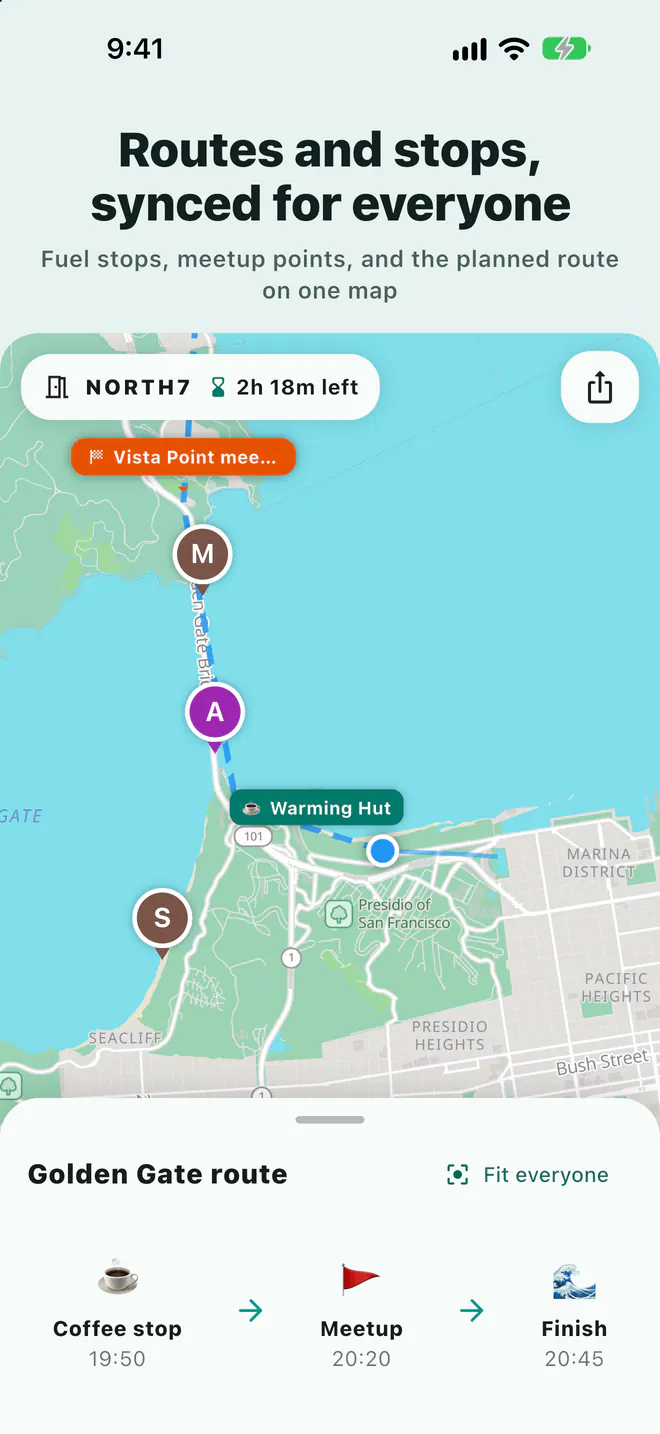
A Laiki room puts the whole group, the meeting points, and the planned route on one map, and all of that needs a connection. Pro lets you download 1 offline region and Max 5, each up to about 150 × 150 km. Free and Plus have no offline maps.
| Laiki feature | With connection | Without connection |
|---|---|---|
| Basemap | Yes | Downloaded regions only (Pro, Max) |
| Companion locations | Live | Frozen at last known position |
| Sharing your location | Yes | No |
| Hold to talk | Yes | No |
| Add or move meeting points | Yes | No |
| Event QR check-in | Yes (Max) | Scans are saved on the organizer's phone and sync when the connection returns |
Pre-trip checklist
- Download offline maps over a stable connection, covering the whole route and any likely detours.
- Test in airplane mode to confirm the map really opens.
- Open the room while you still have signal: check every person appears and is updating, and add meeting points and the planned route.
- Agree on no-signal rules: where to regroup, at what time, and who goes back if someone doesn't show.
- Bring a power bank: continuous location uses more battery, and everyone's battery level shows on the map.
Neither Laiki nor an offline map can call for help without a connection. Laiki's SOS only alerts people in the same room and does not contact 911 or any rescue service. If you're heading somewhere with no coverage, bring a device made for it.
FAQ
Can Google Maps give walking directions offline?
According to Google Maps Help, transit, bicycling, and walking directions are unavailable offline. Driving navigation works if the entire route is inside the offline map.
Can I see where my friends are without a connection?
Not live. Offline maps store only the map, and other people's locations travel over the internet. In Laiki, companions stay at their last known positions until they're back online.
Does the Laiki free plan include offline maps?
No. Offline maps come with Pro (1 region) and Max (5 regions), each up to about 150 × 150 km, and they cover only the basemap.
Do offline maps expire?
Google Maps offline maps must be updated before they expire. Apple Maps keeps offline maps updated automatically by default. Opening them once on a connection before you leave is the safest bet.
Sources
Related guides
- Group motorcycle rides: how does everyone know where everyone is?
- How do you share your location from an iPhone with an Android user?
- Multi-car road trip: how do you keep the cars together?
- Group bike rides: how do you keep from dropping anyone?
- Group hiking: how do you keep everyone together on the trail?
- Group rides and meetups: how do you collect RSVPs and check people in?
- How do you share your location temporarily without being tracked forever?
- Walkie-talkie options for group rides, compared
- Life360 alternative: temporary group sharing vs ongoing family location
Next trip, just open a room
The free plan already includes rooms, live location, meeting points, and planned routes.
Get Laiki